Admin How-To Guide
Registering A New Organization
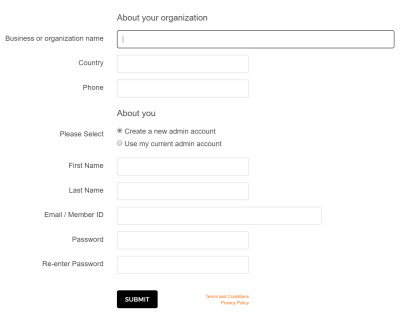
Registering your organization is a quick and simple process.
In order to use the ChallengeRunner platform to create and manage fitness challenges, you must first create an admin account. Click the New Organization button on the ChallengeRunner home page.
You are required to fill in information about your organization and create an admin account.
NOTES:
- We do not accept credit card information on the ChallengeRunner website during registration. If you choose the Core Edition when creating a challenge, you will be asked to enter credit card information to proceed.
- The About your organization section provides details about the business or group to ChallengeRunner.com such as name, country and phone number.
- The person specified in the About you section will become the default group administrator. You may add additional administrators later.
- If you have an existing ChallengeRunner account and wish to use it as an admin for a new group or if you would like to use one admin account to administer multiple organizations, select option Use my current admin account in the About You section of the Register Your Organization page.
- If your organization is a Covered Entity under HIPAA, check the provided box, sign the Business Associate Agreement and send it to hipaa@challengerunner.com